Now fully automated
I love Waitlists
Now with fully automated SMS included. There's even more to love with Waitlist automation by Healthengine.
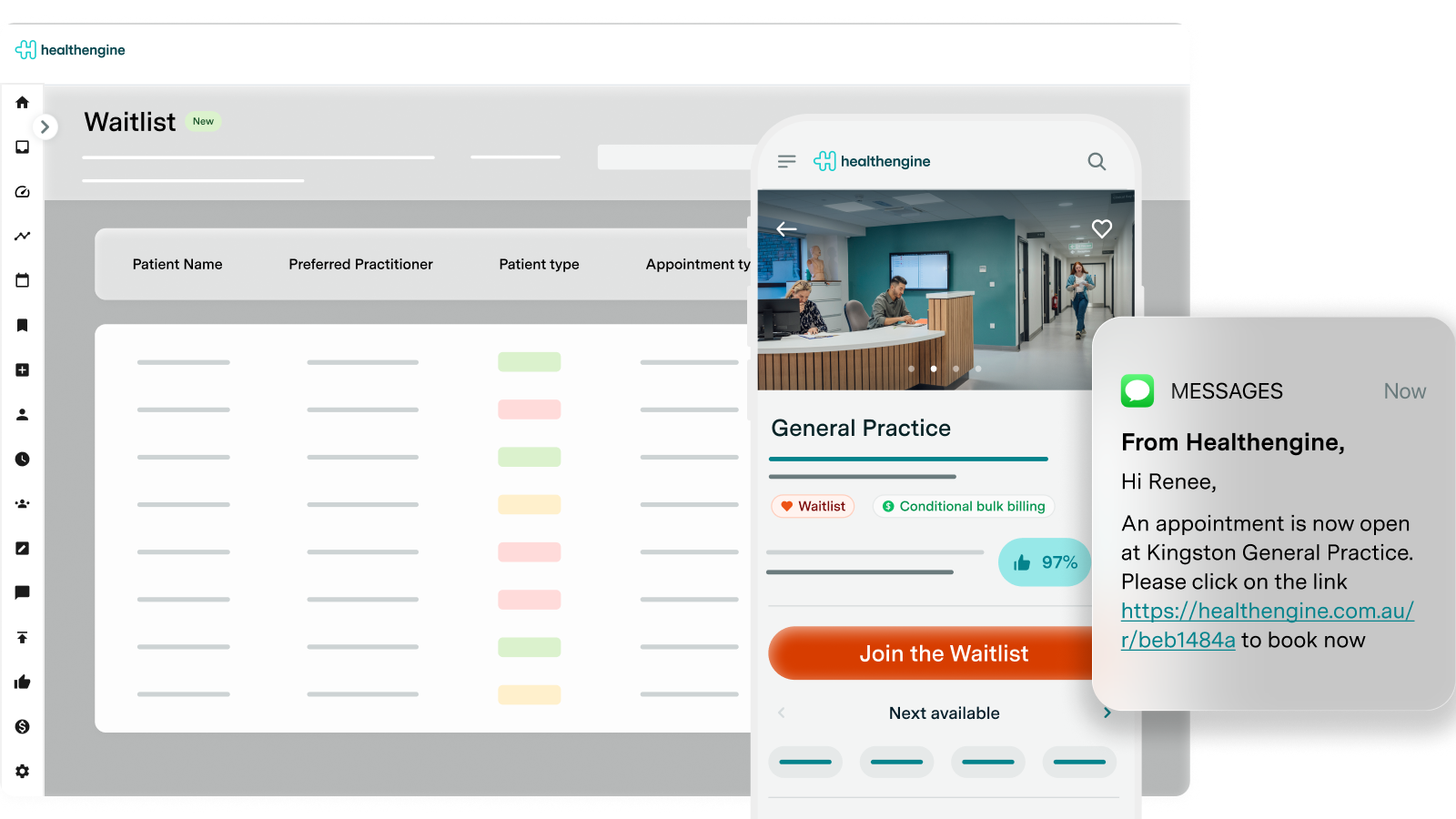
New automated SMS turns cancellations into bookings in seconds.

The Waitlist solution you'll fall in love with
“I love waitlists”... said no one ever. How can you love anything that's complex for both practices and patients, hard to manage, and requires a lot of admin hours each week.
You can't, but when you have a waitlist solution that can; turn cancellations into appointments in seconds, save time, deliver more patient care, create more practice revenue and simplify the entire waitlist process... there's more to love.
Waitlists by Healthengine gives patients the ability to add themselves to an online waitlist via the same Healthengine booking form they already know and love. Save your reception team hours of admin time, and quickly fill cancellations by notifying patients via SMS of new available appointments.
It's the new waitlist management solution you'll fall in love with, now with automated SMS, by popular request.
Hear from our happy customers
The new Waitlist feature has been such a fabulous solution for me as a solo practitioner without admin support. As appointments in my calendar become available, Healthengine offers the appointment to clients on my waitlist automatically! I am the biggest fan of Healthengine!
Dr Melissa Vella, Practitioner and Owner, Dr Melissa Vella Psychology Clinic

Frequently Asked
Questions

What is Waitlists?
Waitlists by Healthengine gives your patients the ability to add themselves to an online waitlist via the same Healthengine booking form they already know and love. This allows you to save on reception team hours and admin time with less patient calls and direct enquiries to the front desk, requesting to be added to a waitlist.
When your practice has a cancellation and needs the appointment filled at short notice, we'll automatically SMS patients from your waitlist that match the appointment preferences with a link to book. Prefer to choose waitlisted patients to notify manually? You can manually select waitlisted patients you'd like to notify of a newly available appointment, and then SMS them individually or in bulk.
It's the Waitlist solution you'll fall in love with, now with automated SMS.
What is Waitlist automation?
Filling last-minute cancellations is now even easier with our new automated SMS feature for waitlists.
We'll automatically SMS waitlisted patients when an appointment opens up with a link to make a booking.
Who can get Waitlists?
Waitlists are available to GP, Dental, Allied and Specialist practices. There are some limitations on Waitlist automation for some Dental customers. Talk to our team about the right plan for your practice.
Do I need to pay for each SMS send for Waitlists?
No additional SMS fees with this one! Healthengine provides the SMS sends to patients as part of the Waitlists feature at no additional per SMS cost.
How do patients add themselves to the Waitlist?
Once you've activated Waitlists, there's a setting that allows patients to add themselves to your Waitlist, which can be toggled on / off in Practice Admin. The default setting is off, meaning patients can't autonomously add themselves to your Waitlist without your practice first enabling this setting.
When the setting is on, there are various Waitlist entry points that can be found on your Healthengine Profile and within your practice's booking form that encourages patients to add themselves to a Waitlist slot if no suitable time is available.
The following locations will display Waitlist options for patients:
- The appointment time selection page in your practice's booking flow when a patient clicks the See all appointments button
- The appointment time selection page in your practice's booking flow when a patient hasn't selected a time
- Your website widget booking page
Can practice staff add patients to the Waitlist manually?
We understand that some patients may still want to call the practice or walk-in before requesting to be added to your Waitlist. When this happens, you have the ability to manually add patients to your Waitlist all within the Healthengine dashboard.
With Waitlists, you simply fill in a number of questions regarding the entry, including the patient's name and contact details, the type of appointment they want to have, the practitioner they wish to see (if they have a preference), any additional notes you'd like to add for triaging as well as what days and times they are available.
How many patients can I contact from the Waitlist at the same time?
For both the automated SMS or manual bulk SMS options, up to 10 patients can be notified at a time.
What happens if my practice doesn't offer appointments for new patients?
We've got you covered! If a patient tries to add themselves to your Waitlist as a 'new' patient, when a practice only has appointment types for existing patients, or doesn't accept new patients, the patient is prevented from adding themselves to the Waitlist and sees a message explaining the practice doesn't offer those appointment types to new patients.
How do I inform patients that our practice now offers Waitlists by Healthengine?
Head to the Resources Section in Practice Admin to download a collection of in-practice marketing assets and collateral you can use to promote Waitlists to your patients. We also recommend using Healthengine's Communicate add-on to send existing patients bulk SMS messages, letting them know of your new online Waitlist services.
How do I see a demo of Waitlists?
We're excited to show you what we've been working on! If you're interested in learning more about how Waitlists works through a demo, simply complete the contact form on this page and our friendly team will be in touch.
Are patients automatically removed from the waitlist if they make a booking?
Yes, patients are automatically removed from the waitlist if they book an appointment at your practice.